Advertising disclosure: When you sign up or purchase through links on this page, we may earn an affiliate commission at no extra cost to you.
Use Your Crypto for Everyday Spending — Without Ditching Self-Custody
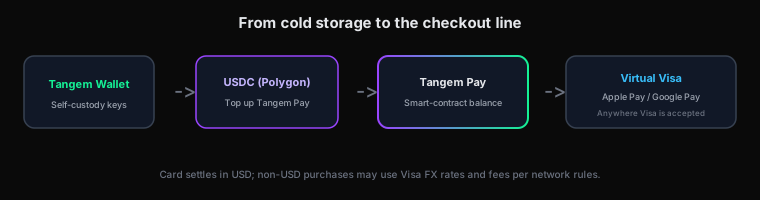
In the next few minutes, you will see exactly how Tangem Pay turns a hardware-wallet lifestyle into tap-to-pay reality: a virtual Visa card inside the Tangem app, funded with USDC on Polygon, while your main stack stays on the card where it belongs.
The problem self-custody power users quietly accept
You did the hard part. You moved SOL (or other assets) off the exchange. You stake, you sleep better, you preach “not your keys.” Then life happens: groceries, a flight, a subscription — and the friction returns. Too often, the “practical” path is still send to a custodian, convert, withdraw. That is not a moral failure; it is a product gap.
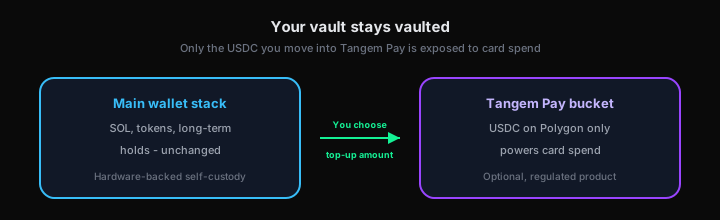
Tangem Pay is aimed squarely at that gap. It is an optional payment layer inside the same Tangem ecosystem many Solana holders already trust for mobile, hardware-backed staking. You fund a separate spending bucket. You tap Apple Pay or Google Pay. The merchant sees Visa. Your long-term vault does not get dragged into every swipe.
What Tangem Pay is (in one clean sentence)
According to Tangem’s product description, Tangem Pay is a non-custodial payment account inside the Tangem Wallet app that lets you spend using a virtual Visa card — online or in-store via Apple Pay and Google Pay — after you top up with native USDC on Polygon. You are not asked to park your entire portfolio on an exchange just to buy coffee.
For the official walkthrough and feature list, open Tangem Pay — How it works (third-party site).
See the money path (diagram)
This is the mental model most readers are missing — where funds sit before you tap your phone at the terminal.
“Your vault stays vaulted” — not marketing fluff if you use it that way
Tangem separates the hardware-wallet / main wallet experience from the regulated card program. In plain English: you can keep the bulk of your self-custody stack untouched and only migrate what you are willing to spend into the Tangem Pay bucket.
If you are a Solana holder, read this before you fund
Tangem Pay spending is powered by USDC on Polygon, not native SOL on Solana. That matters for planning: you will bridge, swap, or withdraw USDC to Polygon from whatever stack you use today. Many users buy or withdraw stablecoins from an exchange that supports Polygon USDC; others use on-chain bridges — each path has its own fees and risks. There is no shortcut to ignoring that step.
Once you have Polygon USDC, Tangem’s flow is: open the app → add funds → send native USDC (Polygon) into your Tangem Pay smart-contract balance. After confirmation, those funds are available for card spend per Tangem’s documentation.
Need SOL first? Where to buy SOL in 2026 walks through on-ramps we track.
Three steps to your first tap-to-pay (high level)
Details, fees, countries, and issuer names live in our Tangem Pay FAQ hub — use it as your reference sheet. Here is the momentum version:
Create the card inside the Tangem Wallet app. Tangem describes this as instant inside the app experience.
Tangem states that Rain handles verification as an independent issuing partner so global payments can comply with regulations — and that Tangem does not see your personal KYC data for that process.
Fund from Tangem Wallet or an external wallet. Add the virtual card to your phone’s wallet app, then pay anywhere Visa is accepted, subject to program rules and regional availability.
Seven reasons crypto natives actually click “activate”
- From cold storage to hot coffee: Tangem’s pitch is everyday spend — coffee, groceries — without treating your hardware wallet like a checking account.
- Have crypto, will travel: Same card story for flights and hotels where Visa works — with FX and cross-border economics handled under standard Visa rules when you are not spending in USD.
- Optional regulated layer: Tangem Wallet stays self-custodial; Tangem Pay is the optional identity-verified product for real-world settlement.
- On-chain USDC, card settlement: Tangem describes purchase amounts debiting USDC from a smart-contract account while Visa settles merchants in USD — check their FAQ for the exact mechanics.
- Withdraw what you do not spend: Unused USDC (Polygon) can be moved back to Tangem Wallet per Tangem’s documentation.
- No Tangem transaction or monthly fee at launch — with the usual caveats (FX, network gas, future ATM fees if added).
- Roadmap signals: Physical cards, rewards, and more regions — worth watching if you are not eligible today.
Do this next (direct command)
If you already own a Tangem card, open the official Pay section and walk the three steps above. If you do not, grab hardware first — then activate Pay inside the app.
Download Tangem & Get $10 BTC Bonus → Order Tangem (Code CRYPTOVAULT, 10% off) →Read Tangem’s official Pay page →
Products, fees, and country availability change. Always confirm current terms in the Tangem app and on tangem.com before moving funds.
FAQ cheat sheet
We maintain a dedicated page with fees, countries, supported assets, issuer disclosures, and limits in Q&A form — optimized for search and quick scanning.